Student Detail Page Metrics

Created by ELSA Customer Support, Modified on Thu, 2 Apr at 7:59 AM by Matthew


ELSA School Dashboard - Student Detail Page Metrics

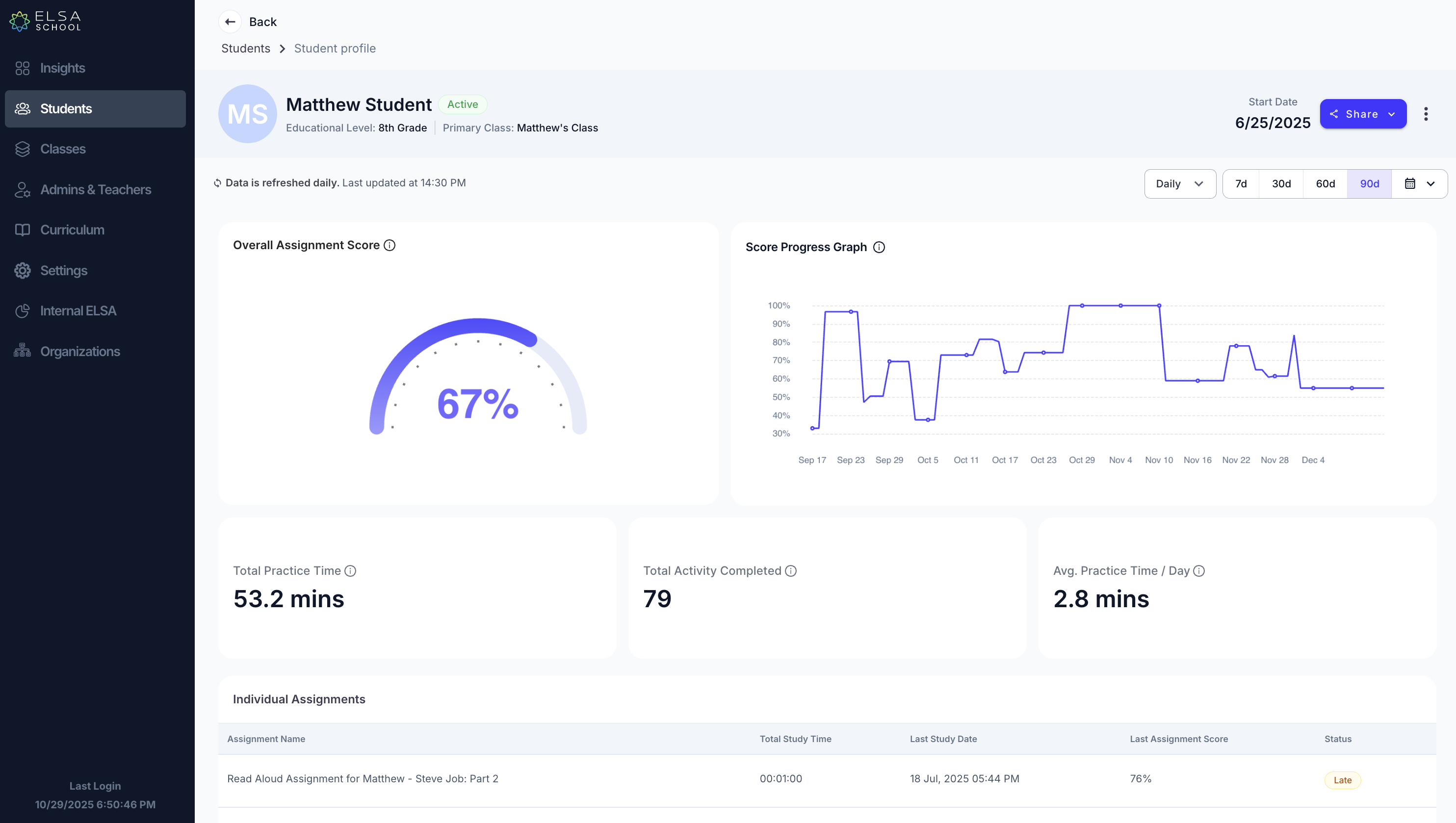
The Student Detail Page provides an in-depth view of an individual student's learning progress and engagement patterns. This article explains each metric and visualization available when viewing a specific student's performance data.
Available Metrics

Overall Assignment Score

What it measures: An individual student's comprehensive performance indicator across all learning activities.

How it's calculated: The Overall Assignment Score is calculated as the average of average assignment scores across all activities (Study Set + Read Aloud + AI Roleplay), including repeated assignment scores for that specific student.

Example calculation:

  • Student A:
    • Study Set average: (50% + 70%) ÷ 2 = 60%
      • Attempt 1: 50%
      • Attempt 2: 70%
    • Read Aloud average: (30% + 40%) ÷ 2 = 35%
      • Attempt 1: 30%
      • Attempt 2: 40%
    • AI Roleplay average: 50%
      • Attempt 1: 50%
    • Student's Overall Assignment Score: (60% + 35% + 50%) ÷ 3 = 48.3%

What it tells you: This score provides a comprehensive view of the student's performance across all learning activities. It accounts for improvement through repeated attempts and gives you a holistic understanding of their current proficiency level.


Score Progress Graph

What it measures: The change in the student's Overall Assignment Score over the selected time period.

How to interpret it:

  • Upward trend: The student is consistently improving their performance
  • Downward trend: Performance may be declining and could benefit from additional support
  • Flat trend: Performance is stable but may indicate a learning plateau
  • Fluctuating pattern: May suggest inconsistent study habits or varying difficulty levels

What it tells you: This visualization helps you track the individual student's learning journey over time. Use it to identify improvement patterns, celebrate progress, or determine when intervention might be helpful.


Total Practice Time

What it measures: The cumulative time a student has spent actively learning within the selected time period.

How it's calculated: Practice time equals learning time, measured as the duration between the start of an assignment until completion of that assignment. Total practice time is the sum of time spent completing all assignments for the selected time period, including repeated completed assignments.

Example calculation:

  • Study Set 1: 30 seconds
  • Read Aloud: 1 minute 30 seconds
  • Study Set 2: 30 seconds
  • Total Practice Time: 2 minutes 30 seconds

Technical details:

  • Calculated in minutes, up to 2 decimal places
  • Includes time for repeated assignments
  • Only counts completed assignments

What it tells you: This metric indicates the student's engagement level and time investment in learning. Higher practice time often correlates with better learning outcomes, but efficiency is also important to consider.


Total Activity Completed

What it measures: The total number of learning assignments the student has successfully completed.

How it's calculated: Activity equals assignment, which includes:

  • Study Set assignments
  • Read Aloud assignments (with or without warm-up)
  • AI Roleplay assignments

Total activity completed is the count of all completed assignments, including repeated assignments.

Example calculation: If a student completes:

  • 1 Read Aloud assignment
  • 1 Study Set assignment
  • Repeats the Study Set 2 additional times
  • Total Activity Completed: 4 assignments

Important notes:

  • Does not count AI roleplay sessions done independently in the Student App
  • Only counts assignments delivered by the teacher
  • Includes repeated attempts as separate completed activities

What it tells you: This metric shows the student's overall engagement and willingness to practice. Students who repeat assignments demonstrate commitment to improvement.


Average Practice Time / Day

What it measures: The average amount of time the student spends practicing per active day during the selected period.

How it's calculated: Total Practice Time ÷ Active Days in Selected Period

Technical details:

  • Calculated in minutes, up to 2 decimal places
  • Only counts days when the student was actually active (completed at least one activity)
  • Based on the selected time period filter

What it tells you: This metric helps you understand the student's daily learning habits and consistency. It's useful for:

  • Setting realistic practice time goals
  • Identifying students who may be spending too little or too much time per session
  • Understanding learning pace and efficiency

Individual Assignments

What it shows: A detailed list of all assignments that have been assigned to the student, along with their respective performance details.

Typical information includes:

  • Assignment name and type
  • Start and due dates
  • Completion status
  • Score achieved
  • Number of attempts
  • Time spent on each assignment

What it tells you: This section provides granular insight into the student's performance on specific assignments, helping you identify strengths, weaknesses, and patterns in their learning approach.


Tips for Using Student Detail Page

  1. Progress Monitoring: Regular check-ins using the Score Progress Graph can help identify when students need additional support or are ready for advanced challenges
  2. Time Management: Use Average Practice Time/Day to help students develop healthy study habits and realistic daily goals
  3. Engagement Assessment: Compare Total Activity Completed with assigned work to understand completion rates and engagement levels
  4. Quality vs. Quantity: Balance Total Practice Time with Overall Assignment Score to understand both effort and effectiveness
  5. Individual Goal Setting: Use baseline metrics to set personalized improvement targets for each student

Frequently Asked Questions

Q: Why might a student have high Total Practice Time but low Overall Assignment Score? A: This could indicate the student is struggling with the material and may benefit from additional instruction or different learning approaches. They're putting in effort but may need support to improve effectiveness.

Q: What's considered a good Average Practice Time/Day? A: This varies by age group and learning goals. Generally, consistent daily practice (even if brief) is more beneficial than sporadic long sessions.

Q: Do repeated assignments help improve the Overall Assignment Score? A: Yes, repeated assignments are included in the average calculation, so students who practice and improve through repetition will see their scores increase.

Q: Why might Total Activity Completed be higher than the number of assignments given? A: This happens when students repeat assignments. Each completion (including repeats) counts as a separate activity.

Q: How can I help a student whose Score Progress Graph shows a plateau? A: Consider introducing new challenge levels, varying activity types, or providing additional learning resources to help break through the plateau.


Understanding Student Activity Status

A student is marked as active if they completed at least one activity (Study Set, Read Aloud, or AI Roleplay) on a unique day.

A student is marked as inactive if they did not complete any activity on a unique day.

This status affects the calculation of Average Practice Time/Day, as only active days are counted in the denominator.


For additional support with interpreting individual student data or developing intervention strategies, please contact your ELSA School administrator or submit a support ticket

The Student Detail Page provides an in-depth view of an individual student's learning progress and engagement patterns. This article explains each metric and visualization available when viewing a specific student's performance data.

Available Metrics

Overall Assignment Score

What it measures: An individual student's comprehensive performance indicator across all learning activities.

How it's calculated: The Overall Assignment Score is calculated as the average of average assignment scores across all activities (Study Set + Read Aloud + AI Roleplay), including repeated assignment scores for that specific student.

Example calculation:

  • Student A:
    • Study Set average: (50% + 70%) ÷ 2 = 60%
      • Attempt 1: 50%
      • Attempt 2: 70%
    • Read Aloud average: (30% + 40%) ÷ 2 = 35%
      • Attempt 1: 30%
      • Attempt 2: 40%
    • AI Roleplay average: 50%
      • Attempt 1: 50%
    • Student's Overall Assignment Score: (60% + 35% + 50%) ÷ 3 = 48.3%

What it tells you: This score provides a comprehensive view of the student's performance across all learning activities. It accounts for improvement through repeated attempts and gives you a holistic understanding of their current proficiency level.


Score Progress Graph

What it measures: The change in the student's Overall Assignment Score over the selected time period.

How to interpret it:

  • Upward trend: The student is consistently improving their performance
  • Downward trend: Performance may be declining and could benefit from additional support
  • Flat trend: Performance is stable but may indicate a learning plateau
  • Fluctuating pattern: May suggest inconsistent study habits or varying difficulty levels

What it tells you: This visualization helps you track the individual student's learning journey over time. Use it to identify improvement patterns, celebrate progress, or determine when intervention might be helpful.


Total Practice Time

What it measures: The cumulative time a student has spent actively learning within the selected time period.

How it's calculated: Practice time equals learning time, measured as the duration between the start of an assignment until completion of that assignment. Total practice time is the sum of time spent completing all assignments for the selected time period, including repeated completed assignments.

Example calculation:

  • Study Set 1: 30 seconds
  • Read Aloud: 1 minute 30 seconds
  • Study Set 2: 30 seconds
  • Total Practice Time: 2 minutes 30 seconds

Technical details:

  • Calculated in minutes, up to 2 decimal places
  • Includes time for repeated assignments
  • Only counts completed assignments

What it tells you: This metric indicates the student's engagement level and time investment in learning. Higher practice time often correlates with better learning outcomes, but efficiency is also important to consider.


How Practice Time is measured per assignment & lesson

  • Practice time for a Study Set lesson is recorded at the exercise level. It is the length of the audio recording of one single practice.
    • Practice time will stack if the students repeat the exercise by pressing "Try Again". 
    • If the student idles for more than 2 minutes in between during the activity, we will stop counting the study time till the student resumes activity (e.g. moving the mouse or making the tab active again).
  • Practice time for a single Read Aloud lesson is the length of the audio recording.
  • Practice time for a single AI Roleplay lesson is the length of the conversation (from start till student finishes conversation).
  • Practice time will be captured if the student press "Submit" or "Continue" button. It will not be captured if the student quits the activity.
  • The lesson practice time will stack with each attempt.
  • The total practice time for the assignment is the sum of all lesson practice time in that assignment, inclusive of repeat.

Total Activity Completed

What it measures: The total number of learning assignments the student has successfully completed.

How it's calculated: Activity equals assignment, which includes:

  • Study Set assignments
  • Read Aloud assignments (with or without warm-up)
  • AI Roleplay assignments

Total activity completed is the count of all completed assignments, including repeated assignments.

Example calculation: If a student completes:

  • 1 Read Aloud assignment
  • 1 Study Set assignment
  • Repeats the Study Set 2 additional times
  • Total Activity Completed: 4 assignments

Important notes:

  • Does not count AI roleplay sessions done independently in the Student App
  • Only counts assignments delivered by the teacher
  • Includes repeated attempts as separate completed activities
  • Includes repeated attempts on a single exercise within the study set.

What it tells you: This metric shows the student's overall engagement and willingness to practice. Students who repeat assignments demonstrate commitment to improvement. 


Average Practice Time / Day

What it measures: The average amount of time the student spends practicing per active day during the selected period.

How it's calculated: Total Practice Time ÷ Active Days in Selected Period

Technical details:

  • Calculated in minutes, up to 2 decimal places
  • Only counts days when the student was actually active (completed at least one activity)
  • Based on the selected time period filter

What it tells you: This metric helps you understand the student's daily learning habits and consistency. It's useful for:

  • Setting realistic practice time goals
  • Identifying students who may be spending too little or too much time per session
  • Understanding learning pace and efficiency

Tips for Using Student Detail Page

  1. Progress Monitoring: Regular check-ins using the Score Progress Graph can help identify when students need additional support or are ready for advanced challenges
  2. Time Management: Use Average Practice Time/Day to help students develop healthy study habits and realistic daily goals
  3. Engagement Assessment: Compare Total Activity Completed with assigned work to understand completion rates and engagement levels
  4. Quality vs. Quantity: Balance Total Practice Time with Overall Assignment Score to understand both effort and effectiveness
  5. Individual Goal Setting: Use baseline metrics to set personalized improvement targets for each student

For additional support with interpreting individual student data or developing intervention strategies, please contact your ELSA School administrator or submit a support ticket.

Was this article helpful?

That’s Great!

Thank you for your feedback

Sorry! We couldn't be helpful

Thank you for your feedback

Let us know how can we improve this article!

Select at least one of the reasons
CAPTCHA verification is required.

Feedback sent

We appreciate your effort and will try to fix the article