The Reporting page allows you to export data as .csv or .xlsx for further analysis.
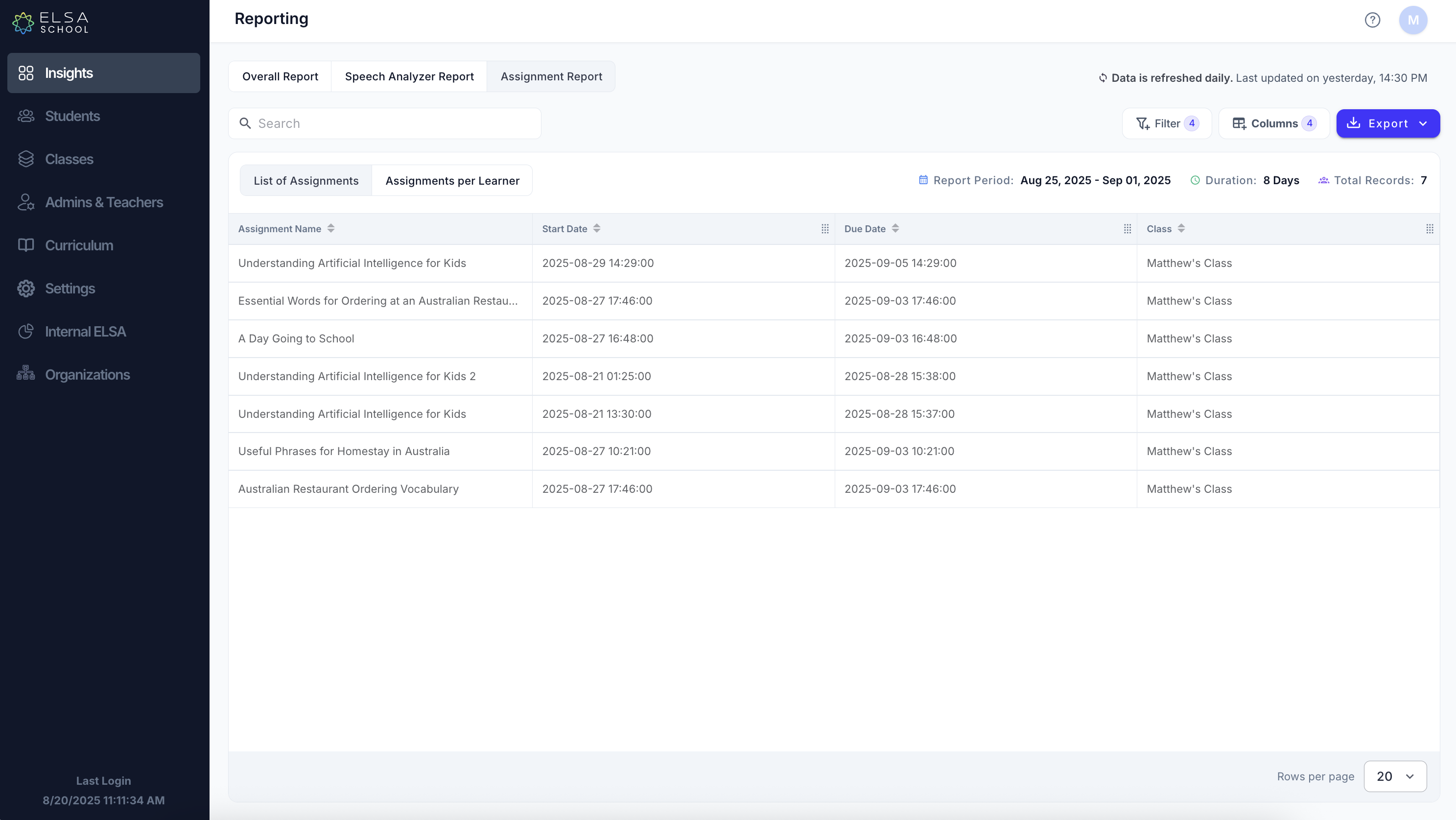
How to Access the Reporting Page
Navigate to the Insights tab on the left-hand menu.
The reporting dashboard will be displayed, starting with the Overall Report.
Understanding the Different Reports
The Reporting page is organized into three main tabs, each offering a unique view of your data:
Overall Report: Provides a high-level overview of student engagement and performance, including study time and overall scores.
Speech Analyzer Report: Offers detailed feedback on individual recordings, breaking down scores by pronunciation, intonation, fluency, and more.
Assignment Report: Gives you in-depth data on specific assignments. This report has two views:
List of Assignments: See performance data for each assignment you've created.
Assignments per Learner: Track how individual students performed on their assigned tasks.
Customizing Your Report View
For each report, you can customize the data you see by using the Columns button. This allows you to focus on the metrics that matter most to you.
Click the Columns button located on the top right of the report table.
A panel will appear with a list of all available data points.
Check or uncheck the boxes to show or hide columns in your report.
Click Close to apply your changes.
Search: Use the search bar to quickly find a specific student or assignment.
Filter: Click the Filter button to narrow your results by a specific date range, class, or other criteria.
Available Columns by Report
Here is a list of the data points you can display for each report:
Overall Report Columns
Student Email: The student's login email address.
Student First Name: The student's first name.
Student Last Name: The student's last name.
Total Study Time: The total amount of time the student has spent on all activities.
Total Assignment Completed: The total number of assignments the student has completed.
Overall Assignment Score: The student's average score across all completed assignments.
Change in Score: The percentage change in the student's score over the selected period.
Last Active: The date and time the student last used the app.
Assignment Report (List of Assignments)
Activity Name: The title of the assignment.
Start Date / Due Date: The assigned start and end dates for the assignment.
Class: The class the assignment was given to.
Total Lesson / Total Exercise: The number of lessons or exercises in the assignment.
Assigned Learners: The total number of students who were assigned the task.
Completed on Time / Completed Late / Not Started: The number of students in each completion category.
Highest / Lowest / Average Score: The highest, lowest, and average scores achieved by students on the assignment.
Average / Total Time: The average and total time spent by students on the assignment.
Completion Rate: The percentage of students who have completed the assignment.
Assignment Report (Assignments per Learner)
Student Email / First Name / Last Name: The student's identification details.
Class: The student's class.
Activity Name: The title of the assignment.
Start Date / Due Date: The assigned start and end dates for the assignment.
Total Lesson / Total Exercise: The number of lessons or exercises in the assignment.
Activity Status: The student's current progress (e.g., Not Started, In Progress, Completed).
First Date Complete: The date the student first completed the assignment.
Highest / Lowest / Average Score: The student's personal scores for the assignment.
Average / Total Time: The time the student spent on the assignment.
Speech Analyzer Report Columns
Email / Student First Name / Last Name: The student's identification details.
Class/Team: The student's class or team.
Recording Name / Source / Category: Details about the audio recording.
Recording Length / Speaking Time: The duration of the recording and the student's speech.
Speaking Time Rate: The percentage of time the student was speaking.
Overall Score: The comprehensive score for the speech.
Pronunciation / Intonation / Fluency: Scores for specific aspects of speech.
Grammar / Vocabulary: Scores for language accuracy and range.
IELTS / TOEFL / CEFR / PTE / TOEIC: Estimated scores on various international English proficiency tests.
Downloading the Data
- Click the Export button to download your current report view as a CSV or Excel file for offline analysis or record-keeping.
Was this article helpful?
That’s Great!
Thank you for your feedback
Sorry! We couldn't be helpful
Thank you for your feedback
Feedback sent
We appreciate your effort and will try to fix the article